Picture a 13-year-old on her mum’s old phone, installing a photo filter app. It wants a birth year. She scrolls back to 1998, taps it, and that’s that. Ten seconds later, she’s in. The app now has her face, her location and her contacts, and it thinks she’s an adult.
Was that her fault? Partly. But under India’s new privacy law, it’s largely the app’s problem.
Verifiable parental consent under the DPDP Act is one of the hardest things to get right, because it sits right where privacy meets product design. Here’s how it works, and how to build it sensibly.
Who actually has to do this
Any app or website that processes the personal data of a child. And under the DPDP Act, a child is anyone under 18. That’s a much higher bar than many global laws, so plenty of products that never thought of themselves as “for kids” are suddenly in scope. Think games, chat apps, coding classes, even fashion shopping. If teenagers use it, this applies.
Section 9 sets out the rule. Before you process a child’s data, you need the verifiable consent of a parent or lawful guardian. Rule 10 of the DPDP Rules explains how. These duties start on 13 May 2027, and breaking the children’s obligations can draw a penalty of up to ₹200 crore.
Why product heads should care
This isn’t a policy page fix. It reaches right into the sign-up screen, the analytics dashboard, the ad setup, maybe even how you plan to grow. And every extra tap before someone gets in costs you users, so how you design it really does matter.
Still, there’s a flip side. Indian parents worry about what apps do with their kids, and they compare notes in every school WhatsApp group. Get the consent step right, keep it quick and polite, and families tend to stay.
So what does Rule 10 actually want?
Rule 10 asks you to take appropriate technical and organisational measures so that consent really comes from a parent. You also have to do due diligence to check that the person claiming to be the parent is an adult who can be identified.
There are two main routes. You can rely on reliable identity and age details you already hold, say if the parent is already a verified user. Or the parent can provide identity and age details, or a virtual token linked to them, issued by an authorised body or available through DigiLocker.
| The law says | You decide | |
|---|---|---|
| Who is a child | Anyone under 18 | How you ask for age at sign-up |
| Verification | Check the parent is an identifiable adult | Which method suits your users |
| After consent | No tracking, monitoring or targeted ads | How you separate child accounts |
| Exemptions | Some classes and purposes are carved out | Whether any truly apply to you |
Illustrative summary of Section 9 and Rule 10, not legal advice.
About those exemptions. The Fourth Schedule carves out certain cases, like clinical establishments, schools and crèches for specific purposes, and some narrow uses such as confirming that a user isn’t a child. Read them closely before you lean on them. They are much narrower than they look.
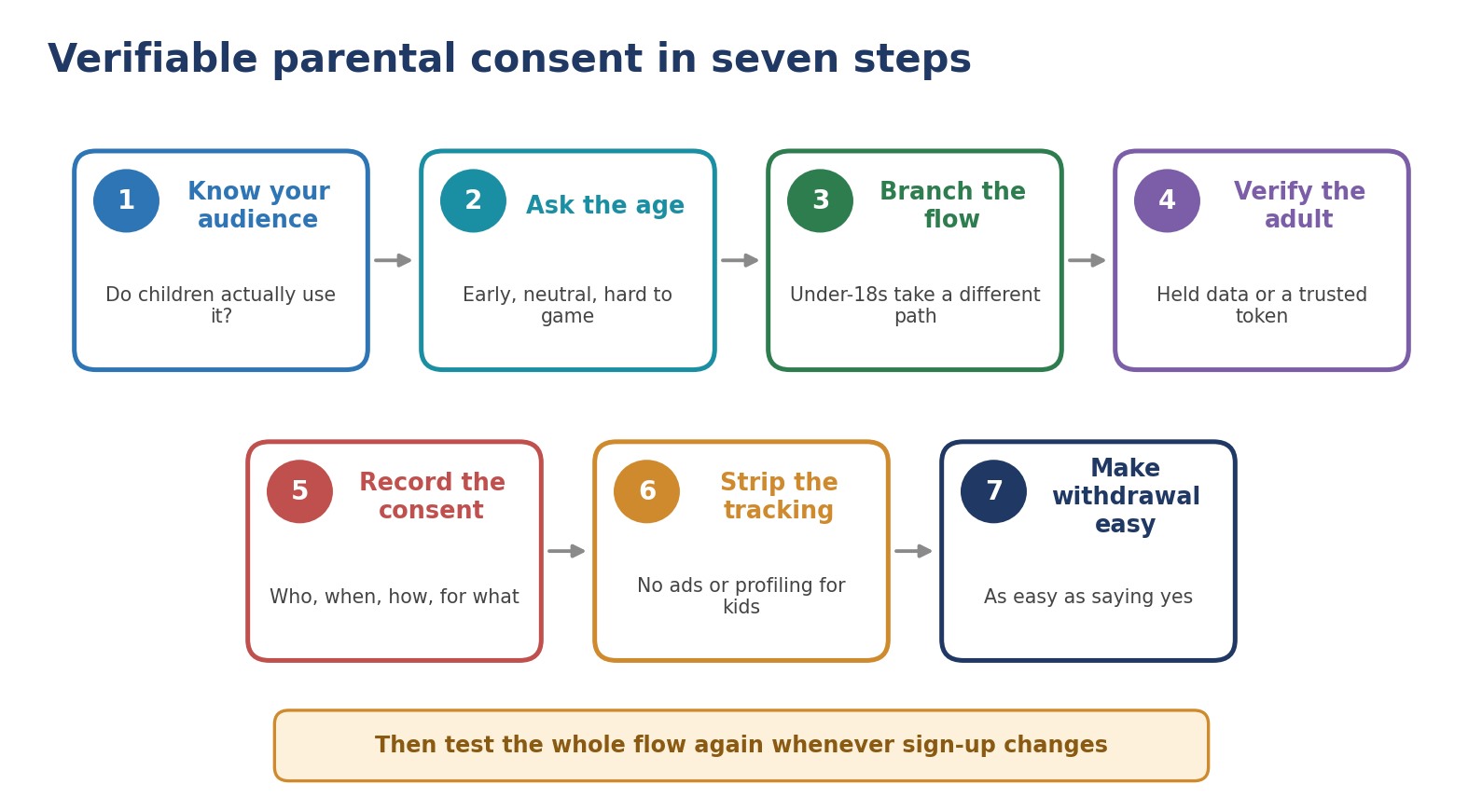
Figure 1. Verifiable parental consent in seven steps.
Building verifiable parental consent under the DPDP Act
Here’s a practical order for most apps and websites.
1. Know your audience. Be honest about who uses your product. Check app store ratings, support tickets and user research. If teenagers show up, plan for them, even if your marketing says “18+“.
2. Ask the age early. Put an age question at the very start, before you collect anything else. Keep it neutral. A screen that says “you must be 18” just teaches kids which year to pick.
3. Branch the flow. Once you know a user is under 18, send them down a separate path. Pause data collection until a parent has been verified, and collect only what’s needed to reach that parent.
4. Verify the parent. Use a parent’s existing verified account if you have one. No account? Then the parent can share ID and age details, or pass a token through DigiLocker. Go for whatever is lightest while still showing there’s a grown-up on the other end.
5. Write it all down. Note who said yes, for which kid, on what date, how you checked them and exactly what they agreed to. Should the Board come asking, this log is pretty much all you’ve got.
6. Strip the tracking. Children’s accounts can’t be tracked, behaviourally monitored or shown targeted ads. That means turning off ad SDKs and profiling for those accounts, not just hiding the ads.
7. Make withdrawal easy. A parent should be able to withdraw consent as easily as they gave it. When they do, stop processing and tell your vendors to stop too.
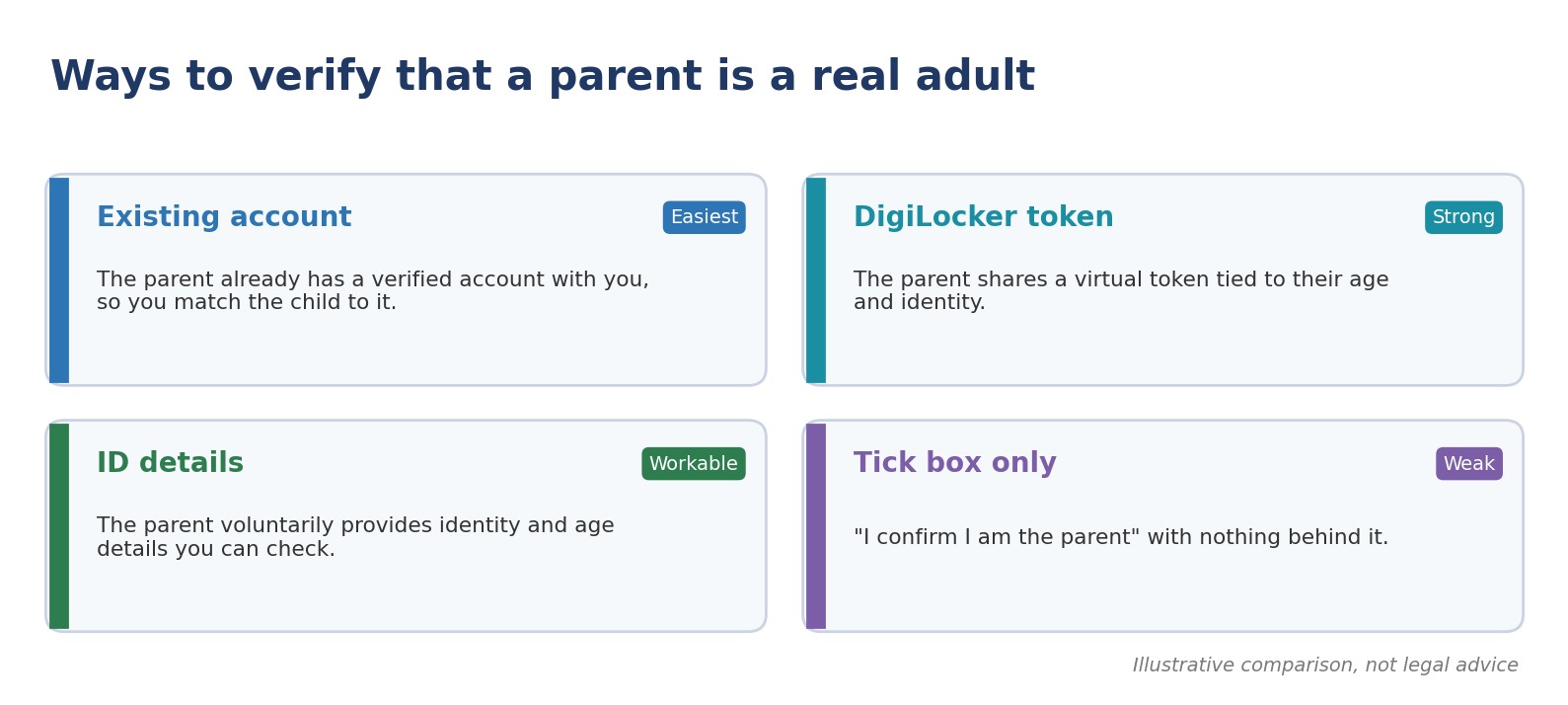
Figure 2. Ways to verify that a parent is a real adult, from strongest to weakest.
What a good consent record looks like
Keep it boring and complete. Child’s account ID, parent’s identity reference, verification method, date and time, the exact notice shown, what was agreed, and any later withdrawal. Store it securely and separately from marketing systems.
One example, to make it real. Child account: 48211. Parent verified via existing account. Consent: lessons and progress reports only. Shown: notice version 3, in Hindi. Date: 2 June 2027. Withdrawn: not yet.
Who should be in the room
The product owner, because the sign-up flow is theirs. The DPO, who runs the privacy programme. Engineering, who build the branching and logging. Marketing, who’ll lose some targeting tools. And legal, for the grey areas and the exemptions.
Don’t forget persons with disabilities
The same idea extends beyond children. Some adults with disabilities can’t make legally binding decisions, even with help. For them, the yes has to come from a lawful guardian, and Rule 11 wants you to check that guardian was really appointed, by a court or the authority named under the relevant law. If your users include care homes, special schools or disability groups, fold that check into the same flow. Treat it with the same seriousness, and keep the same kind of record.
Where these go wrong
The same few mistakes keep showing up. A tick box saying “I am a parent” with nothing to back it. Age gates that tell kids exactly what to type. Ad SDKs that still fire on children’s screens. Consent stored only as a front-end flag that nobody can find later. And no way at all for parents to change their minds.
What to do this quarter
Five things, in this order.
- Find out how many of your real users are under 18.
- Redesign the age question so it’s neutral and comes first.
- Choose a verification method and test it with real parents.
- List every SDK and tracker that touches children’s accounts.
- Build a consent log you could hand to the Board tomorrow.
If you want a head start, Consiva’s consent and preference management captures verified parental consent, keeps a full audit trail and handles withdrawal across your systems in one place. Take a look at the pricing page, or talk to the team.
Frequently Asked Questions
It’s consent for processing a child’s data that comes from a parent or lawful guardian whose identity you’ve checked. Section 9 of the DPDP Act requires it before you process any data of a person under 18. Rule 10 then goes a step further: you have to be satisfied the parent is a real adult you could identify. A line saying “I’m the parent” won’t usually get you there.
There are two routes in Rule 10. The easy one is when the parent already has a verified account with you, so you just link the child to it. Otherwise the parent shares identity and age details, or a token from an authorised source like DigiLocker. Most apps should pick whichever is lighter for families while still proving it’s an adult saying yes.
Yes, if children actually use it, the rule still applies. The test is whether you’re processing a child’s personal data, not who your marketing team targets. Because the age threshold is 18, many general apps have teenage users. An honest look at your real audience is the right first step before you decide anything.
You can’t run targeted advertising directed at children, and you can’t track or behaviourally monitor them. That rules out profiling, retargeting and lookalike audiences built from children’s data. Some generic, non-personalised content may be fine, but take advice first. Switching off ad SDKs for child accounts is the safer approach for most apps.
Yes, the Fourth Schedule of the DPDP Rules lists some exemptions. They cover certain classes, like clinical establishments, educational institutions and childcare centres, for specific purposes. They also cover some narrow uses, such as confirming that a user isn’t a child. They’re narrow, honestly narrower than most people assume, so read the wording slowly before you count on one.
Breaching the obligations around children’s data can lead to a penalty of up to ₹200 crore. The Board looks at how bad it was, how long it went on, and what you did once you found out. That’s why a tidy consent log matters so much. It’s the first thing you’d want to show them.